Showing posts with label self portraiture. Show all posts

Monday, 14 January 2013

Photobooth Photographs

I took these photographs which were inspired by the Andy Warhol Photobooth photographs. These are self portraits, which were also inspired by Mariell Amelie. I used different props to create the effect of different personnas, even though you could tell it was me in all of the photographs. On photoshop I created the effect of a photo strip (a line of 4 photographs) to make it look like the photographs were taken in a photobooth. I also made the photograph black and white (above) and also in sepia :

to create a vintage effect. Overall, I think that I like the slight sepia effect is the best as it creates a vintage feel but also keeps the colours of the clothes and props - which is important relating to my chosen theme of fashion. I also like the polaroid camera prop, as I think that this adds to the vintage theme for the sepia images.


I then decided to experiment with using a traditional photobooth border the the images, and made them more portrait than landscape - it also looked more professional :

Andy Warhol Photobooth

warhol-portraits2.jpg

Andy Warhol was an artist who was a leading figure in the visual art movement known as pop art. The photographs above are from a series titled Andy Warhol Photobooth. I think that this idea is interesting as the setting looks natural and can be recreated fairly easily. I think that these photographs look simple making the people in them the main focus of the image. I could recreate similar photographs that relate to my theme, by dressing up and taking photographs of different styles for example gothic. As I'm doing fashion photography, I'd need to focus more on the details in the top/dress, the makeup and the hair/accessories as you wouldn't be able to see the trousers/skirt/shoes. I'm also doing self portraiture, so I think that for each image I could replicate different styles and photographs, so that the viewer would have to look closely to be able to tell that it was me in every picture. 

These images are in black and white (although they appear slightly yellow toned here), which I think creates more shadow and tones to the photographs. If I were to recreate the images I think that I would use either black and white or sepia to replicate the vintage feel. However, I could keep them in colour to keep the photographs feeling modern. I could even have a mix of both for a vintage yet modern approach - something to think about. For these photographs, I create fashion/makeup/hair looks that are typically vintage to go with the idea of a photobooth.To relate it to my final outcome for this challenge, I think that I could mix the gothic fairytales with this idea of presenting my images. What I like about these images is that they're simple and basic, with the plain background and the lack of colour, but each photograph is interesting as there is something different happening in each of them. The viewer pays attention to each individual photograph rather than just the photo strip as a whole. It makes you wonder what the model was thinking at that exact time that the photograph was taken, and why they did a specific pose etc...

What I like about these images so much is that you get to see more of the personality behind the models in these photo strips. Although I plan to take on slightly different personas in each photo strip, I could refer back to these images to look at the poses. Something that I think about when I look at these pictures was were the models somehow listening to music? Sometimes music can affect your mood and perhaps inspired them for their poses, however this is just a thought. 

Friday, 11 January 2013

Mariell Amelie


Marielle Amelie is a London based photographer who focuses on self portraits. I personally am really inspired by her work, as my recent work has been fashion mixed with self portraits. I think that I could relate this style of photography to both gothic and fairytales whilst combining them to create a contrast. For example, I could find an idylic setting - but wear all black, or I could take the photograph in a graveyard when it's dark, but wear all white. I think that this would be interesting as it would make the viewer really think about the whole photograph and the elements within it. This artist also sometimes does ghost photography, which is also what I am inspired by, so perhaps I could combine that also.

I think that this work is particularly interesting because of the settings that she uses as well as the outfits. For example, in the third image, the sheer cape that she is wearing is being blown to the right, but as it is sheer we can see the background through it - making it again appear ghostly and mysterious. Throughout the pictures I've noticed that although it is the same person, she has taken over different personas in a subtle way, especially over the years of her self-portraiture.

In the first two images, they are set at night, so you can't always see the background, however the artist has picked what she wants to be lit in the image, so she almost has more control over the what is shown in the picture, whereas the third picture is set during the day and is therefore lit, however it makes the photograph seem more 'innocent'.

In the second picture I think that it would be fairly easy to recreate with the technique of light painting, which is something that I might try. I think that it looks interesting and effective, and adds colour to the shot. It could be interesting the make the photograph black and white and to have just the light painting in colour. I think that you could combine both the gothic and innocent fairytale effect to the same image.

Overall, I really like the work of Marielle Amelie as I think that it is unique and interesting. I find it inspiring for self portraiture and plan to take inspiration from this for my final outcome. 

Monday, 7 January 2013

Ghost Photography Experimentations

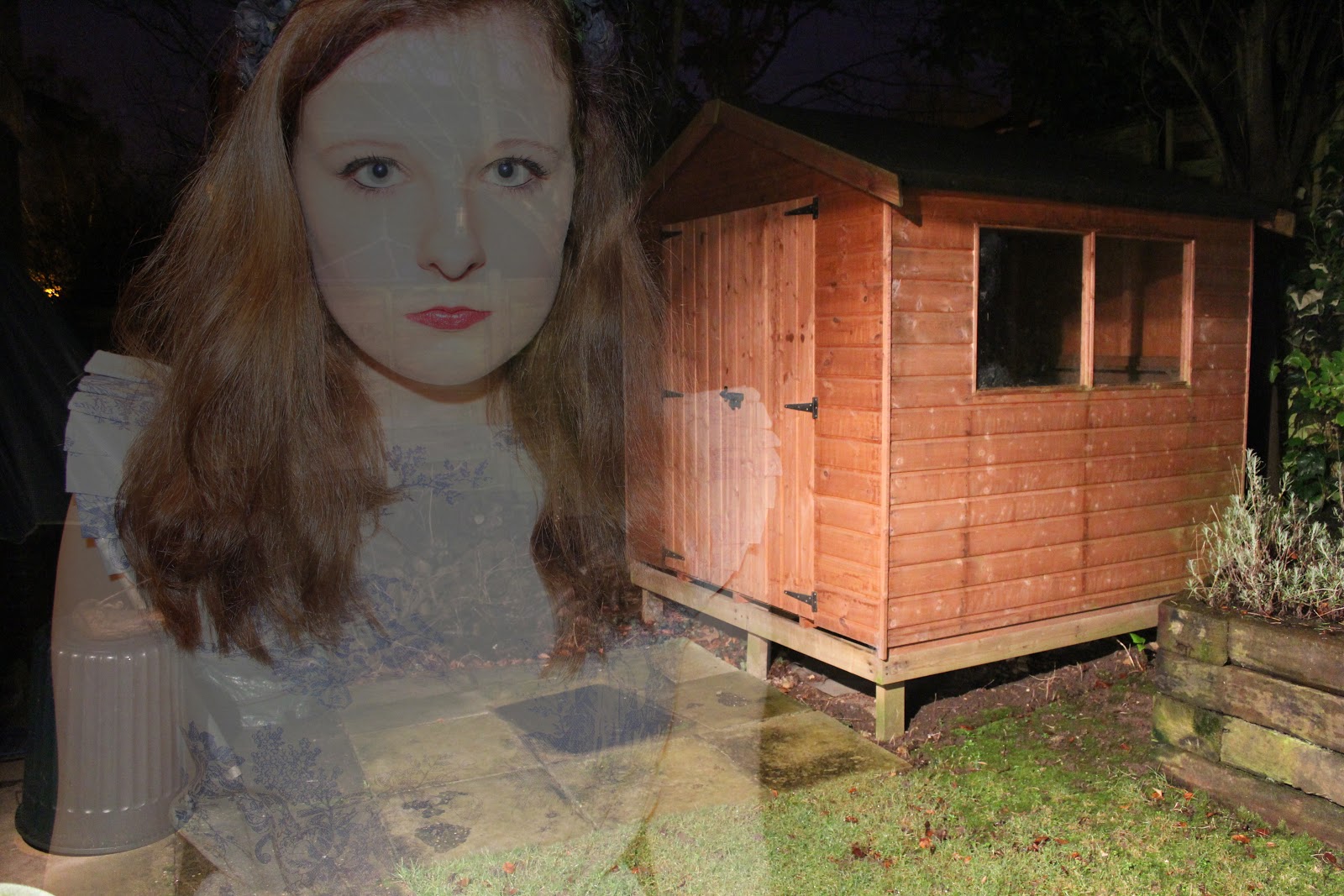
 For this experiment, I decided to try out the ghost photography technique. I took photographs and created a double exposure technique in photoshop. Some of the photographs I took were over exposed as this helped to give a more 'ghostly' effect when I double exposed the images:


For the three photographs above, I took the pictures outside at night time. I thought that this added a unique and mysterious effect as well as creating a more gothic feel to the photograph. I played around with using the flash on my camera - which did give a ghostly effect, however I preferred using the outside light, as this gave a slightly softer effect.

To create this effect in photoshop, open up your two images, and copy and paste one into the other as a new layer. Then change the opacity to around 50%, however this will change depending on your chosen photographs. For some of the images I also changed the layer type to screen, as this gave a more over exposed effect which I think made the ghost effect better and more interesting, as it was harder to see the 'ghost'.


For the two photographs above, I took this photographs inside using softbox lighting. I put them quite close as this gave a harsher effect - which made everything look slightly more doll like - relating to the fairytale idea. The second photograph is more faint which I think creates a more ghost like effect - it also creates the idea of two separate ghosts rather than just one in the background, which I think is interesting.

For the photograph above, I again blended the two images and then added a dark blue layer on top, and changed the layer type to overlay, for a vintage effect. I also then played around with the curves which created a bit more of a blue tone to the image:


This photograph above is simple and is just of the flower headband that I was wearing. I thought it was a contrasting image as it combines both the black and gothic feel with the plain and 'innocent' white background and porcelain skin.